
Recording deals manually is a practice held by many subscribers that seek an organized system and operate their brokerages using Invoices for their billing system.
To record a payment manually, you must first be in the details of the Order, then click "Payments"

The next screen that appears will be a card that allows you to record a new payment.

Below this card, you will find information about the deal, and previously recorded payments, whether they were manually input, or captured by the system.
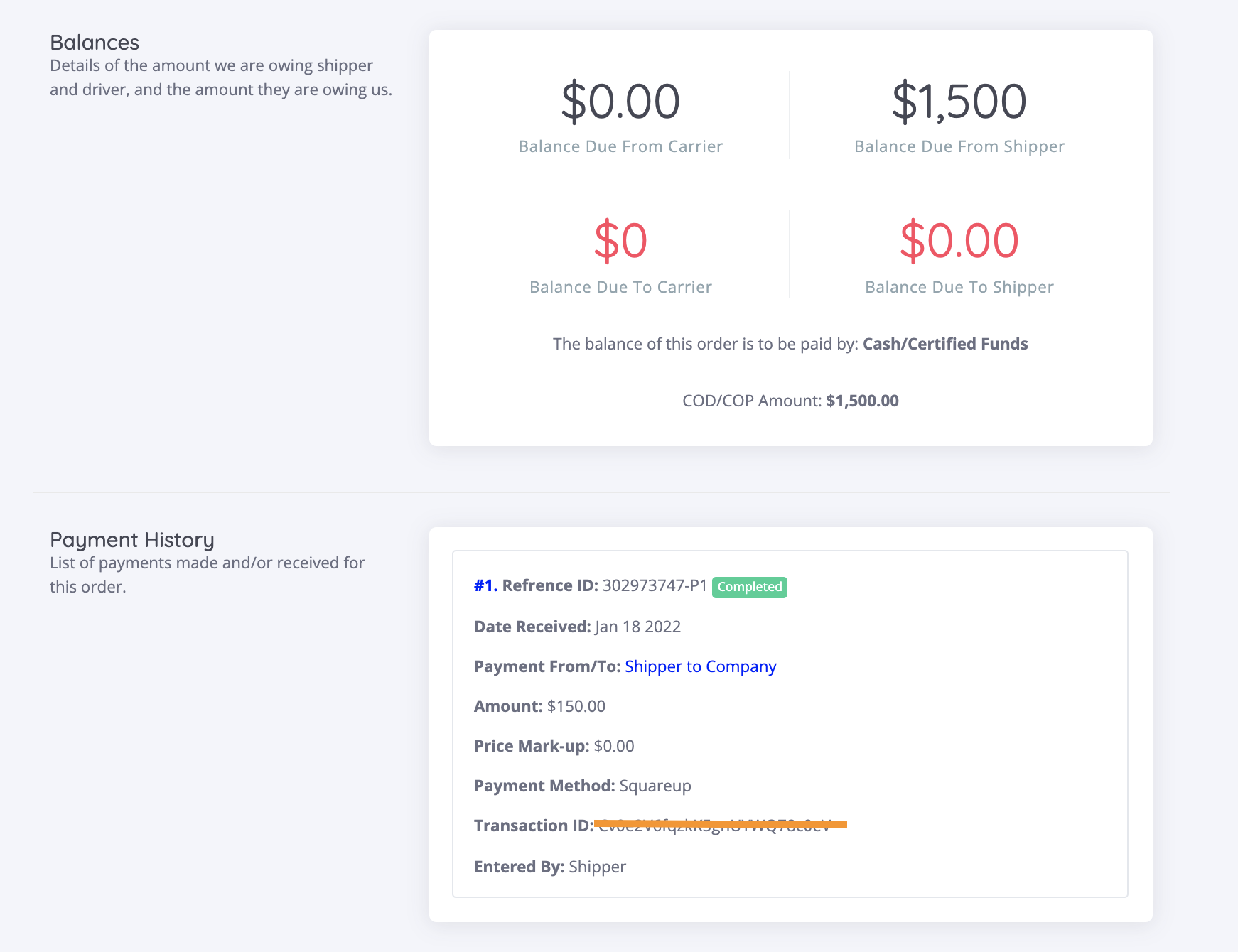
If you're Cronetic account has been integrated with a payment processor, you can submit a payment link to your shipper client, allowing them to plug in a credit card and pay their balance.

Terms Breakdown
Date Received
Payment From/To
- Defines who the transaction is between. The options are:
- Shipper to Company (Shipper's payment to the Carrier)
- Company to Carrier {Broker payment to Carrier)
- Company to Shipper(Broker payment to Shipper)
- Carrier to Company (Carrier payment to Broker)
Amount
- Dollar amount of the transaction that's being recorded
Method
- How the payer is making payment to the payee. The options are:
- Credit card
- Personal check
- Cashiers check
- Money order
- Company check
- Comchek
- Electronic transfer
- Cash
- Other
Transaction ID
- ID that's usually generated by electronic payment processor or external billing department.
Notes
- Text field to record important notes that pertain to the transaction that's being recorded.
Comments
0 comments
Please sign in to leave a comment.